
Quick Telegram URL Sharing for Windows
Overview
The software is designed to streamline the process of sharing web page links via Telegram, specifically for Windows users. It enables users to quickly copy the current browser URL and send it to a Telegram chat with minimal effort. The tool is particularly useful for individuals who frequently share articles, resources, or web content with colleagues, friends, or communities through Telegram. Its primary function is to reduce the manual steps involved in copying a URL and pasting it into a Telegram message, especially when additional context or edits are needed before sending.
Target users include content curators, remote workers, students, and social media managers who rely on Telegram for communication and collaboration. The application is lightweight and focused on a single core task, making it ideal for those who prefer minimal, no-frills tools. While the developer is not explicitly named in the provided information, the software is publicly available on GitHub, indicating an open-source or community-driven development approach. The lack of a formal license suggests users are free to modify and redistribute the code, though they must comply with applicable laws and guidelines.
Real-world usage scenarios include sharing research links during team meetings, sending interesting news articles to personal groups, or forwarding educational resources to study networks. The software operates in the background, launching quickly and integrating with the system clipboard to ensure a seamless experience.
Key Features & Capabilities
- One-click URL sharing to Telegram – Instantly sends the current browser URL to a Telegram chat with a single action, reducing manual copy-paste steps.
- Message editing before sending – Users can customize the message text, add comments, or adjust formatting prior to transmission, enhancing context and clarity.
- Windows-only compatibility – Designed specifically for the Windows operating system, ensuring optimized performance and integration with native system features.
- Lightweight footprint – At just 3.2 MB, the application consumes minimal system resources, making it suitable for older or low-spec machines.
- Open-source code available – The source code is hosted on GitHub, allowing transparency and enabling users to audit, modify, or extend the tool as needed.
These features collectively support efficient content sharing workflows. For example, a student can quickly send a link to a research paper with a note like “Check this section on page 12” before sending. A content manager might use it to share a trending article with a team chat while adding a summary. The tool’s simplicity ensures that users can focus on their message rather than technical setup.
User Interface, Workflow & Performance
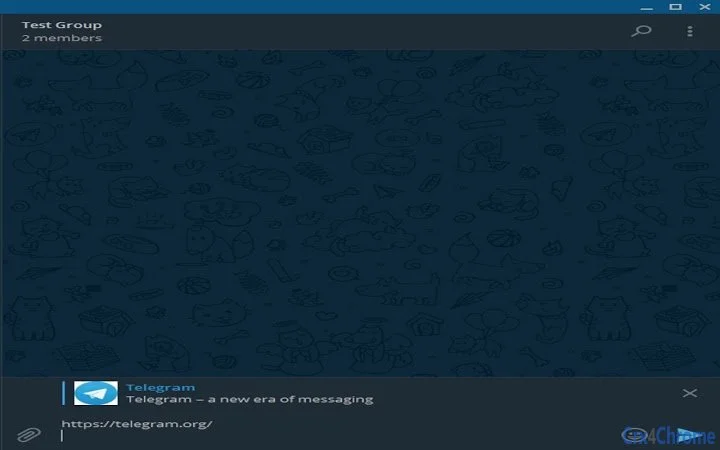
The user interface is minimal and task-focused, designed to avoid distractions. It likely features a single button or system tray icon that triggers the URL capture and sharing process. Navigation is straightforward: users activate the tool while a browser window is active, and the current URL is automatically detected and displayed in a message composer window. From there, users can edit the message before sending it to Telegram.
Workflow efficiency is high, as the tool eliminates multiple steps—copying the URL, opening Telegram, pasting the link, and typing a message. Instead, the process is condensed into one action with optional customization. The application is expected to launch quickly and operate in the background without interfering with other tasks.
Performance details were not specified by the developer. However, given the small file size and single-function design, the software is likely to have low CPU and memory usage. Stability is assumed to be consistent for basic use cases, though no formal testing data was provided. The developer did not specify resource usage details or behavior under heavy system load.
Compatibility & System Requirements
The software is confirmed to run on Windows operating systems. The exact version or build requirements were not listed, so compatibility with specific Windows editions (e.g., Windows 10, 11) cannot be verified. The installation size is 3.2 MB, indicating a lightweight deployment that does not require significant disk space.
Hardware requirements were not provided. However, based on the file size and function, the tool is likely to operate efficiently on systems with standard specifications. No additional dependencies or third-party libraries were mentioned. The developer did not specify whether the application requires an active internet connection or a running Telegram client to function.
Platform compatibility information is limited to Windows. There is no indication of support for Mac, Linux, or mobile platforms. Users on non-Windows systems will need alternative solutions.
Pros and Cons
Pros
- Simple, focused functionality for fast URL sharing
- Message editing capability before sending
- Lightweight at only 3.2 MB
- Open-source with code available on GitHub
- Free to use with no hidden costs
Cons
- Currently limited to Windows only
- No official license information provided
- Not endorsed or supported by Telegram
- Depends on external applications (browser, Telegram)
- Performance and stability details not disclosed
FAQ Section
Is this software compatible with all versions of Windows?
Compatibility with specific Windows versions was not specified by the developer. The software is designed for Windows, but exact system requirements are not listed.
Is the software safe to use?
The application is open-source, allowing users to inspect the code for potential security risks. However, since it is unofficial and not endorsed by Telegram, users should exercise caution and ensure they trust the source before installation.
Can I update the software automatically?
Automatic update functionality was not mentioned. Users may need to manually check for updates by visiting the GitHub repository.
What type of license does this software use?
The developer did not assign a formal license. Users are free to use, modify, or distribute the code, but must comply with applicable legal standards and guidelines.
Does the software require an internet connection?
While the software itself may not require constant internet access, it relies on a running Telegram client and an active internet connection to send messages. The application does not function without these dependencies.
Final Thoughts + CTA
This lightweight desktop utility delivers a clear and valuable function: simplifying the process of sharing browser URLs with Telegram. Its minimal design, message editing feature, and open-source nature make it a compelling choice for Windows users who prioritize efficiency and transparency. While it lacks official support and is limited to one platform, its free access and straightforward workflow offer real benefits for daily productivity.
For professionals, students, and content sharers who frequently use Telegram, this tool can save meaningful time and reduce friction in communication. The absence of a license or formal documentation is a minor drawback, but the transparency of the code mitigates some concerns.
Overall, it stands out as a reliable, no-cost solution for a niche but common need. If you're on Windows and regularly share links via Telegram, this tool is worth trying.
Download Quick Telegram URL Sharing for Windows now







